Paper airplane template
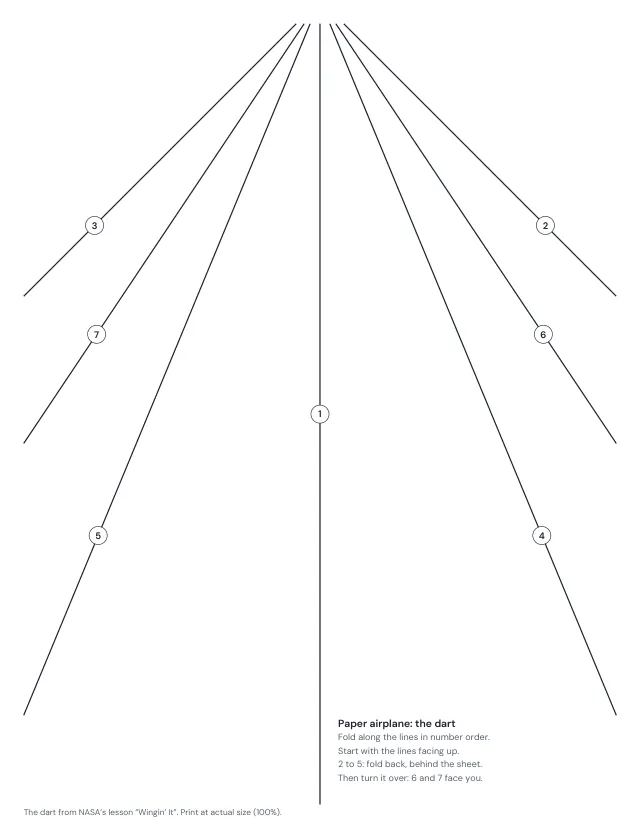
The classic dart, with its seven fold lines printed on the sheet and numbered in the order you fold them. The lines are drawn for the paper you print on, so they meet its edges where the folds need them. Add the folding steps and a flight log, to test how far it flies.
1 page · US Letter · Portrait
Free, with no account, email or watermark. Print at 100% or Actual size.
Make it yours
Paper size, margins and lines
Ready-made PDF (Letter) · Free to print and share copies · Check your print size
4 ready-to-print PDFs
How to fold the dart
Start with the lines facing up, and fold along each line in number order. Fold the sheet in half along line 1, then open it again. At the end where the lines meet, fold both corners back, behind the sheet, along lines 2 and 3; then fold back again along lines 4 and 5, so the slanted edges meet behind line 1. Turn the sheet over: lines 6 and 7 now face you. Fold it in half along line 1, away from you, so the folded flaps stay on the outside. Fold one wing down along line 6, so its top edge meets the bottom edge, then turn the plane over and fold the other wing along line 7. Open the wings level and tip them up a little, into a shallow V, as NASA’s lesson does.
Why the lines are drawn for your paper
Every line starts at the middle of one short edge, which becomes the nose. Lines 2 and 3 fold the corners at half a right angle, 45°, so the short edge lies along line 1; lines 4 and 5 fold at half of that, 22.5°, so the new edges meet at line 1 again; and the wings fold at half of what is left. Where a line reaches the long edge depends on the paper’s shape: line 4 meets it about 19 mm from the far end on Letter, and about 44 mm from it on A4. Every fold depends on the lines meeting exactly at the middle of the short edge, and lines drawn for one paper miss that point on the other: choose the paper you will print on, and print at 100% or Actual size.
Testing how far it flies
The flight log follows NASA’s lesson “Wingin’ It”: fly the plane three times, launching it the same way each time, and measure each flight from where it left your hand to where it first touched the ground. Add the three together and divide by 3 for the average. Then add a little weight, such as a paper clip, and fly it three times more, to see what the weight does. Never throw a plane at anyone.
Goes well with this sheet
Print and assemble
Use the same paper size in the PDF and printer settings. Choose Actual size or 100%. Print a sample before making copies.